Athena
In this section, we introduce Amazon Athena as the fastest way to start analyzing the processed dataset created by the AWS Glue pipeline.
Athena is a serverless interactive query service that allows us to run SQL directly on data stored in Amazon S3. Because it integrates with the AWS Glue Data Catalog, Athena can immediately use the table metadata discovered and maintained earlier in the workshop.
Why Athena Comes First
Athena is a natural first step in the business intelligence layer because it requires:
- No infrastructure to provision
- No database server to manage
- No data loading into a separate analytics engine
Once the processed data is available in Amazon S3 and registered in the Glue Data Catalog, Athena can query it directly.
Athena is ideal for validation, exploration, and ad-hoc analysis before moving to more warehouse-oriented analytics patterns.
How Athena Fits in This Workshop
In the previous chapter, the data pipeline produced a cleaned and structured dataset. Athena sits on top of that output and uses the cataloged metadata to interpret the files correctly.
The flow is:
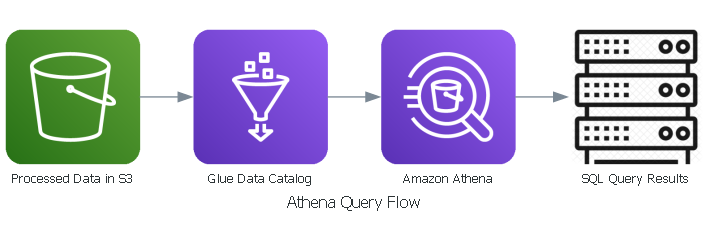
This means Athena does not replace AWS Glue. Instead:
- Amazon S3 stores the actual data files
- AWS Glue Data Catalog stores the table definitions and schema
- Athena reads both to execute SQL queries
What You Will Do in This Section
In the hands-on steps that follow, you will:
- Prepare an S3 bucket for Athena query results
- Open Athena Query Editor and confirm the Glue catalog objects
- Run a validation query on the processed dataset
- Recover missing catalog metadata if needed
- Clean up temporary resources if they were created only for the lab
Learning Outcome
After this section, you should understand:
- What Amazon Athena does
- Why it integrates naturally with AWS Glue and Amazon S3
- How it supports ad-hoc analytics on the workshop dataset
- How to validate that the processed data is query-ready
Section Content
- Prepare Athena Results
- Open Athena and Browse Catalog
- Run Validation Queries
- Recover Missing Catalog
- Cleanup
By the end of this section, you will have a clean, step-by-step Athena flow without overwhelming a single page with too many screenshots.