Analytics Pipeline with AWS Glue
In this chapter, we will learn the fundamental concepts behind an analytics pipeline using Amazon S3, AWS Glue Crawler, AWS Glue Data Catalog, and AWS Glue Visual ETL.
The purpose of this chapter is to help you understand how these AWS services work together before we start the hands-on labs.
This page focuses on concepts and architecture. The detailed step-by-step configuration will be covered in the next sections.
What Is an Analytics Pipeline?
An analytics pipeline is a process that takes raw data, prepares it, transforms it, and makes it ready for analysis or reporting.
In this workshop, the pipeline follows this flow:
The simplified architecture is shown below:
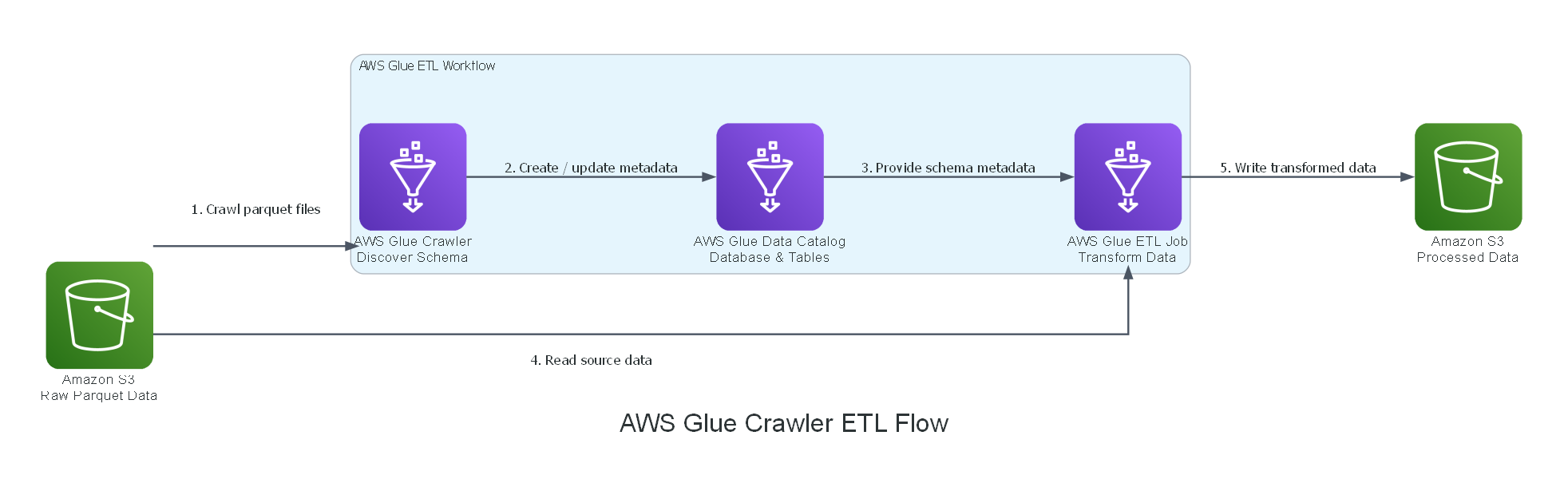
At a high level:
- Amazon S3 stores the raw data files.
- AWS Glue Crawler scans the data and discovers its structure.
- AWS Glue Data Catalog stores the metadata.
- AWS Glue Visual ETL reads the cataloged data and transforms it.
- Amazon S3 stores the processed output.
Why Do We Need This Pipeline?
Raw data stored in Amazon S3 is useful, but by itself it is not always ready for analytics.
For example, if we only have Parquet files in S3, a processing service still needs to know:
- Where the data is located
- What file format the data uses
- What columns exist in the dataset
- What data type each column has
- Whether the data is partitioned
- Where the processed result should be written
AWS Glue helps solve this by providing metadata discovery, catalog management, and ETL processing.
A good data pipeline separates three responsibilities:
- Storage: where the data lives.
- Metadata: how the data is described.
- Processing: how the data is transformed.
Core Services in This Pipeline
This workshop uses four main components.
| Service | Role in the Pipeline |
|---|---|
| Amazon S3 | Stores raw and processed data |
| AWS Glue Crawler | Scans source data and detects schema |
| AWS Glue Data Catalog | Stores metadata such as database, table, schema, and S3 location |
| AWS Glue Visual ETL | Builds a visual workflow to transform data |
Amazon S3: Data Storage Layer
Amazon S3 is used as the storage layer of the data pipeline.
In this workshop, raw data is stored in S3 using Parquet format.
Parquet is commonly used for analytics workloads because it is:
- Columnar
- Compressed
- Efficient for large-scale data processing
- Well supported by AWS Glue and Spark-based ETL jobs
A common S3 layout in a data lake looks like this:
s3://data-lake/raw/
s3://data-lake/processed/
s3://data-lake/curated/
In this workshop, the raw data is stored in S3 first. AWS Glue will not replace S3. It will only discover and process the data stored there.
AWS Glue Crawler: Schema Discovery Layer
AWS Glue Crawler is responsible for scanning the raw data in S3.
The crawler reads the files and tries to understand their structure.
It can detect:
- File format
- Column names
- Data types
- Partition structure
- S3 location
- Table metadata
After scanning the files, the crawler creates or updates tables in the AWS Glue Data Catalog.
AWS Glue Crawler does not move data from S3 into the Data Catalog. The actual data remains in Amazon S3. The crawler only creates metadata that describes the data.
For example:
Raw data:
s3://yellow-taxi-trip-demo-fcaj/

Crawler output:
Database: craw_data_catalog
Table: table_yellow_taxi_trip_demo_fcaj
Location: s3://yellow-taxi-trip-demo-fcaj/
Format: Parquet
AWS Glue Data Catalog: Metadata Layer
AWS Glue Data Catalog is a centralized metadata repository.
It stores information about your datasets, such as:
- Database name
- Table name
- Column names
- Data types
- Partition keys
- File format
- S3 location
The Data Catalog does not store the actual data rows.
Instead, it tells AWS services how to find and read the data from S3.
Think of the Data Catalog as a map. S3 stores the actual data. The Data Catalog tells Glue where the data is and how to understand it.
Example metadata:
Database: craw_data_catalog
Table: table_yellow_taxi_trip_demo_fcaj
Format: Parquet
Location: s3://yellow-taxi-trip-demo-fcaj/
Columns: vendor_id, pickup_datetime, dropoff_datetime, total_amount, ...
AWS Glue Visual ETL: Transformation Layer
After the data is cataloged, we can use AWS Glue Visual ETL to build a transformation workflow.
Visual ETL allows us to design an ETL job using a visual interface instead of writing the full Spark code manually.
The ETL job can:
- Read source data from a Glue Data Catalog table
- Select or rename columns
- Filter records
- Clean invalid data
- Apply transformations
- Write output to another S3 location
The important point is that the ETL job uses the Data Catalog table to understand the source data.
However, when the job runs, it still reads the actual Parquet files from Amazon S3.
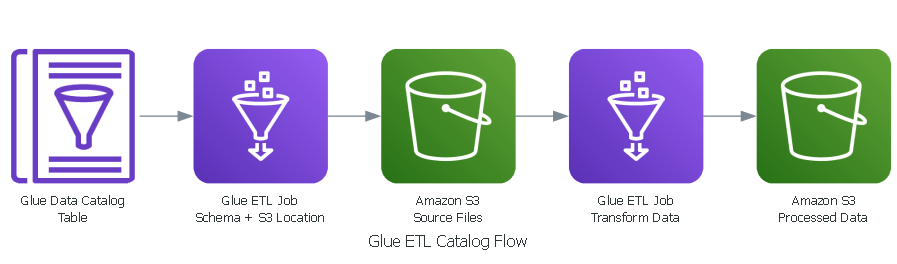
How the Services Work Together
The full flow works like this:
- Raw Parquet files are uploaded to Amazon S3.
- AWS Glue Crawler scans the S3 path.
- The crawler detects schema and file metadata.
- The crawler creates or updates a table in AWS Glue Data Catalog.
- AWS Glue Visual ETL uses the catalog table as input.
- The ETL job reads the actual data from S3.
- The ETL job transforms the data.
- The transformed result is written back to Amazon S3.
The Data Catalog acts as the connection point between the raw data in S3 and the ETL job.
What You Should Understand Before Starting
Before moving to the hands-on labs, make sure you understand these key ideas:
| Concept | Explanation |
|---|---|
| S3 stores data | Raw and processed files are physically stored in S3 |
| Crawler discovers metadata | It scans files and detects schema |
| Data Catalog stores metadata | It stores table definitions, not actual records |
| Visual ETL transforms data | It uses catalog metadata to read and process S3 data |
| Output goes back to S3 | Processed data is written to a target S3 bucket |
Module Structure
This chapter includes the following sections:
| Section | Purpose |
|---|---|
| AWS Glue Crawler | Create a crawler to discover schema from raw S3 data |
| AWS Glue Catalog | Review the generated database and table metadata |
| AWS Glue ETL Job | Build a Visual ETL workflow to transform data |
Key Takeaways
By the end of this introduction, you should understand that:
- Amazon S3 is the storage layer.
- AWS Glue Crawler is the schema discovery layer.
- AWS Glue Data Catalog is the metadata layer.
- AWS Glue Visual ETL is the transformation layer.
- The pipeline starts with raw data and ends with processed data in S3.
A simple way to remember the pipeline: Store → Discover → Catalog → Transform → Store